Multi-platform trade synchronization & account risk management
Sync every account.
Control every risk.
ATLAS Sync mirrors a lead account's trades across your follower accounts on supported platforms, applies per-account risk limits as it goes, and shows every position, lock, and connection in one place.
Cloud when possible. Local when needed. One Command Deck for both.
ATLAS Sync is in invite-only beta. Beta access is complimentary — no billing, no payment details.
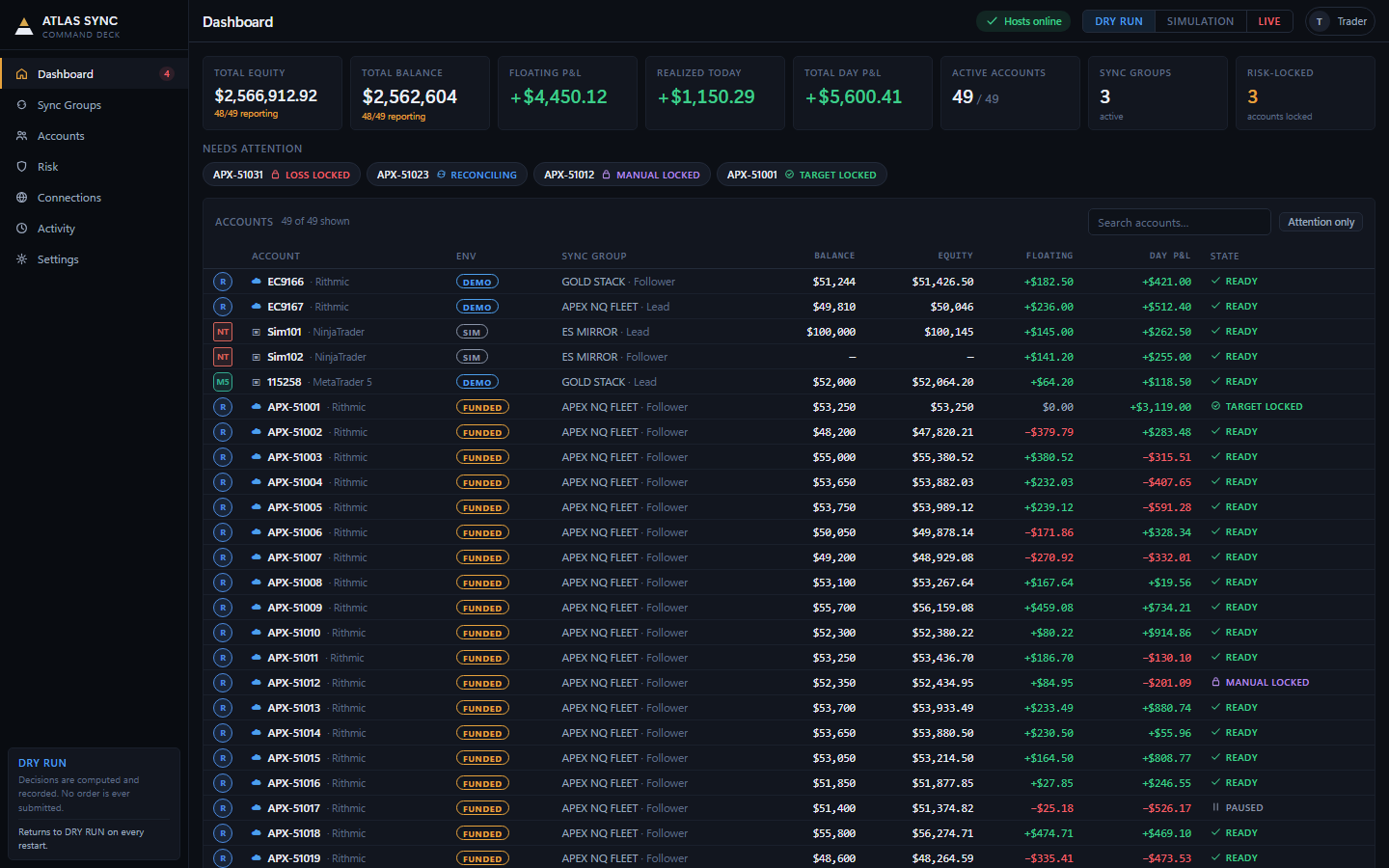
Why ATLAS Sync
The short version.
-
Nothing papered over
An offline host, a reporting gap, a drifted position — shown as exactly that, never silently rounded to zero or hidden.
-
Risk rides with every trade
Daily profit targets, loss limits, and account locks run continuously per account, whether or not you're watching.
-
Cloud when possible, Local when needed
A hosted connection keeps running with your PC off where a platform's API allows it; your own Windows host picks up where it can't.
-
One Command Deck, every device
The same web-based Command Deck on desktop and mobile, included with every plan — no separate app to install.
How it works
One lead. Every follower. Continuously reconciled.
Trade normally
Keep trading your lead account on the platform you already use. Nothing about your own workflow changes.
ATLAS mirrors it
Each position change is copied to every enabled follower — sized by that follower's multiplier and quantity cap, not by blind duplication.
Risk rides along
Daily limits, account locks, and reconciliation run continuously per account, whether or not you're watching.
Connections
Cloud when possible. Local when needed.
Cloud
ATLAS hosts the connection. Synchronization keeps running with your PC off — for platforms whose APIs support a hosted session.
Local Host
Runs through your own Windows trading host — for platforms that require their own local software. Your Command Deck shows host health at all times.
-
NinjaTrader
AvailableLocal Host — Available
Cloud — Pending platform approval
Connect through ATLAS Sync Local Host today. Direct Cloud connectivity is planned and pending NinjaTrader platform/commercial approval.
-
MetaTrader 5
BetaLocal Host
Local Host bridge into MT5 — the path for futures-to-MT5 workflows.
-
Rithmic
Coming SoonCloud
Cloud connection via R | Protocol, currently in vendor validation.
-
Tradovate
Coming SoonCloud
Planned cloud route, pending platform approval.
Statuses reflect the actual state of each integration — we'd rather under-promise than surprise you.
Ecosystem
Where funded accounts already trade.
A sample of independent futures prop trading firms whose funded accounts run on NinjaTrader Desktop or Rithmic — the same platforms ATLAS Sync connects to. NinjaTrader is available today through Local Host; Rithmic is in vendor validation and not yet live (see Connections above).
- Apex Trader Funding
- BluSky Trading Co.
- Bulenox
- Elite Trader Funding
- EmergeProfit
- Lucid Trading
- My Funded Futures
- Phidias
- Take Profit Trader
- Tradeify
NinjaTrader Rithmic
Independent firms, named here for platform context only — not affiliated with,
sponsored by, or partnered with ATLAS Sync. Platform tags reflect each firm's own
listing on NinjaTrader's and Rithmic's public firm directories as of September 2026;
firms in this industry open, close, and change platforms without notice, and a firm's
own rules on automated or copy trading should be confirmed before connecting an
account.
Cross-platform
Futures in. MT5 out.
ATLAS Sync is built to carry a futures workflow into MT5 environments: you configure how each futures instrument maps to an MT5 symbol, and ATLAS translates position changes through that mapping — including the quantity-model differences between futures contracts and MT5 lots.
Mapped instruments are related markets, not identical ones — pricing, contract sizing, and behavior differ. ATLAS applies the translation you configure; it does not promise equivalence between instruments.
| Futures | MT5 | |
|---|---|---|
| MGC / GC | XAUUSD | |
| NQ / MNQ | NAS100 | |
| ES / MES | US500 |
Risk management
Copying is half the product.
Control is the other half.
- Daily Profit Target — lock in the day when an account hits its number.
- Daily Loss Limit — stop the bleeding per account, automatically.
- Max Qty & multipliers — every follower sizes to its own limits, never blindly.
- Follower ON/OFF — pause new copied trades without touching open positions.
- Account-level locks — lock new entries while reductions stay allowed.
- Reconciliation — expected vs. actual position, checked continuously, drift surfaced honestly.
- Connection & host health — an offline host is shown as exactly that, never papered over.
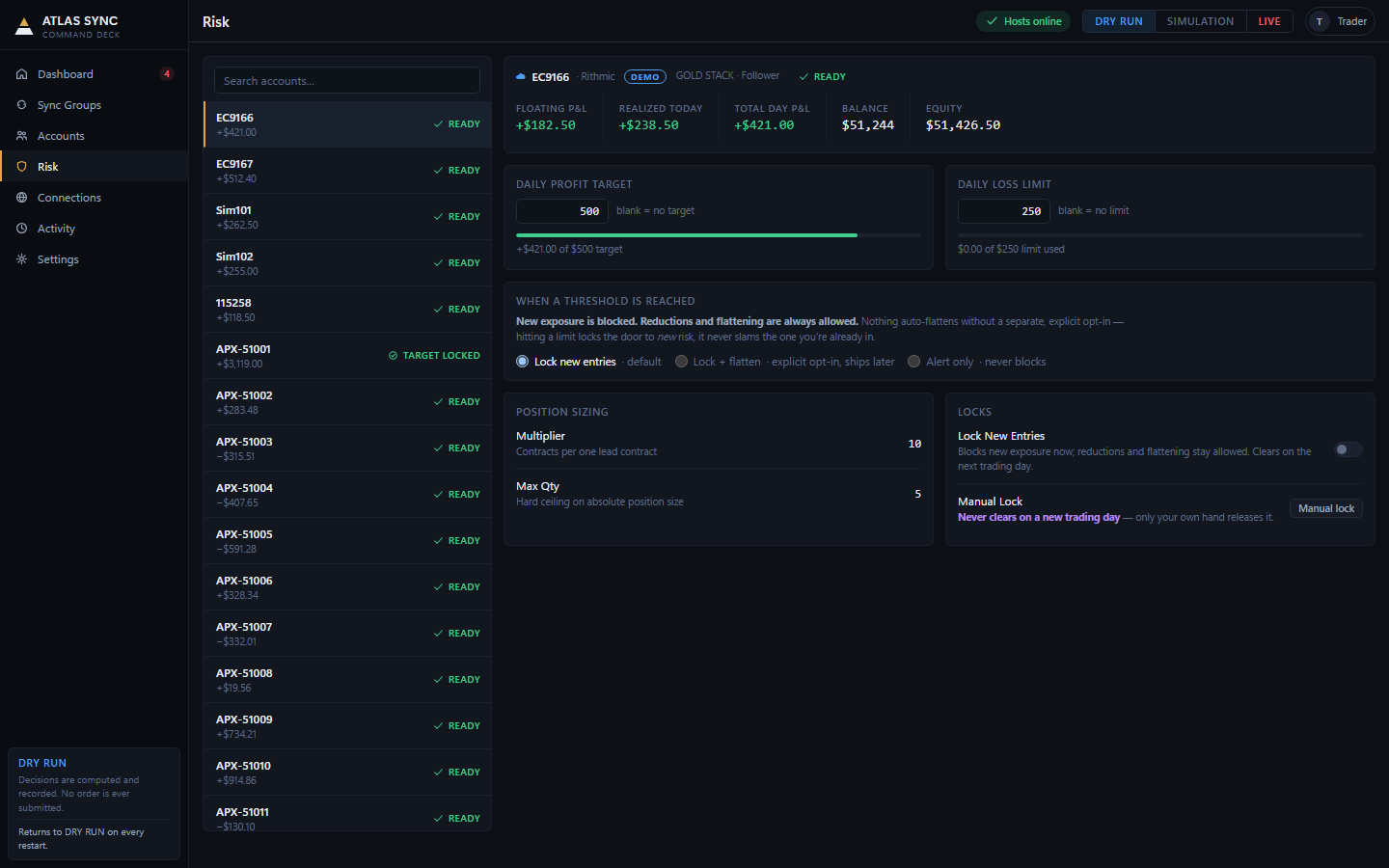
Risk controls reduce and contain exposure; no software can guarantee against loss. See the Trading & Risk Disclosure.
Security & trust
Built the way a trading tool should be.
- Credentials, hashed, never plain text — account passwords are hashed and salted; ATLAS Sync never stores or logs a password in reversible form.
- Real two-factor authentication — TOTP-based MFA with one-time recovery codes, confirmed live with a real code before it can lock an account.
- No account enumeration — sign-in, password reset, and email verification never reveal whether a given email has an account.
- Rate-limited everywhere it matters — login attempts, password resets, and MFA code guesses are all rate-limited.
- Devices and sessions, reviewable and revocable — see every signed-in device and session, and end any of them yourself, any time.
- Credentials handled the way each connection requires — Local Host credentials remain on the user's host where applicable. Cloud connections use provider-authorized connection methods and securely managed credentials/tokens appropriate to that provider.
Full detail in our Privacy Policy and Trading & Risk Disclosure.
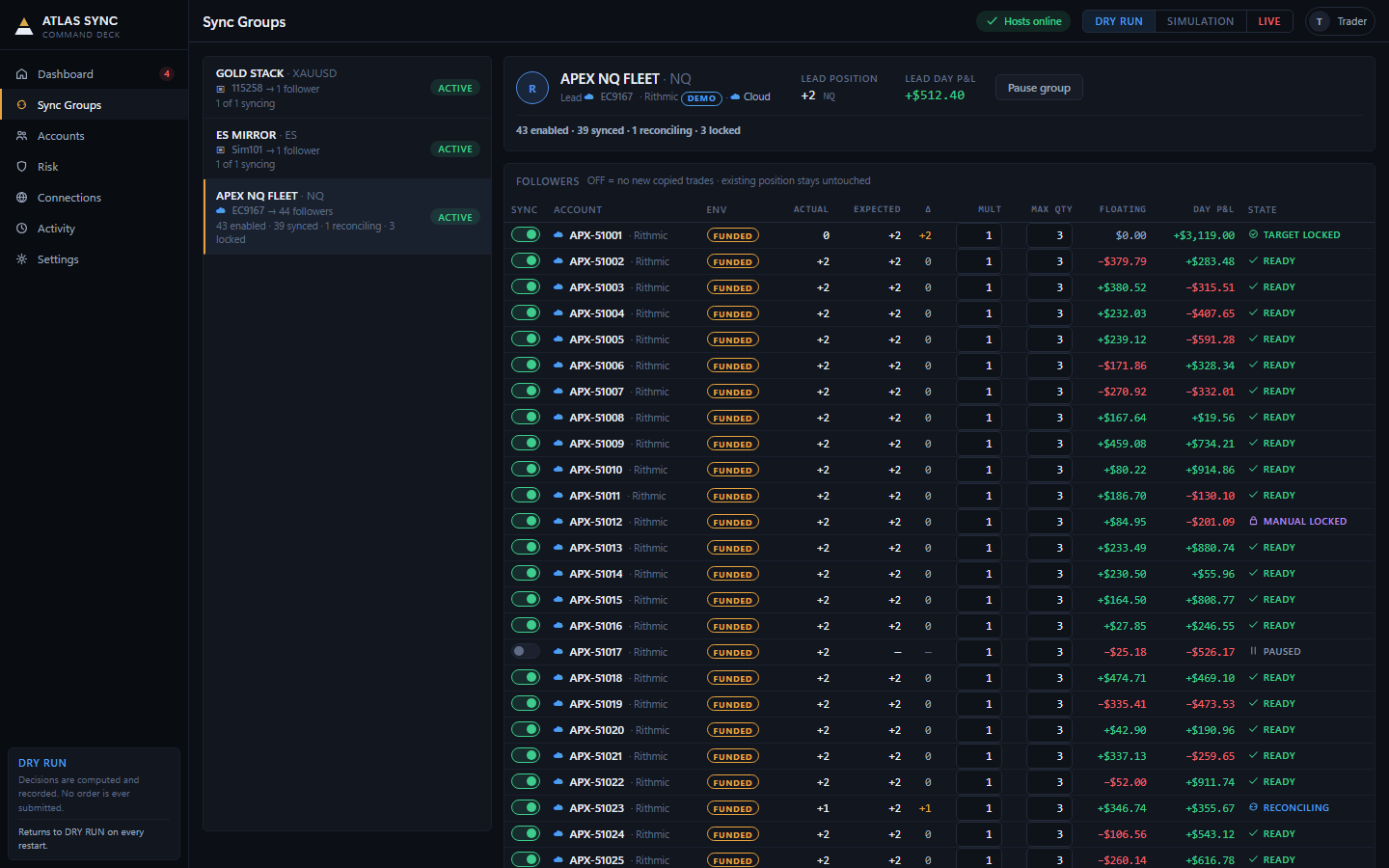
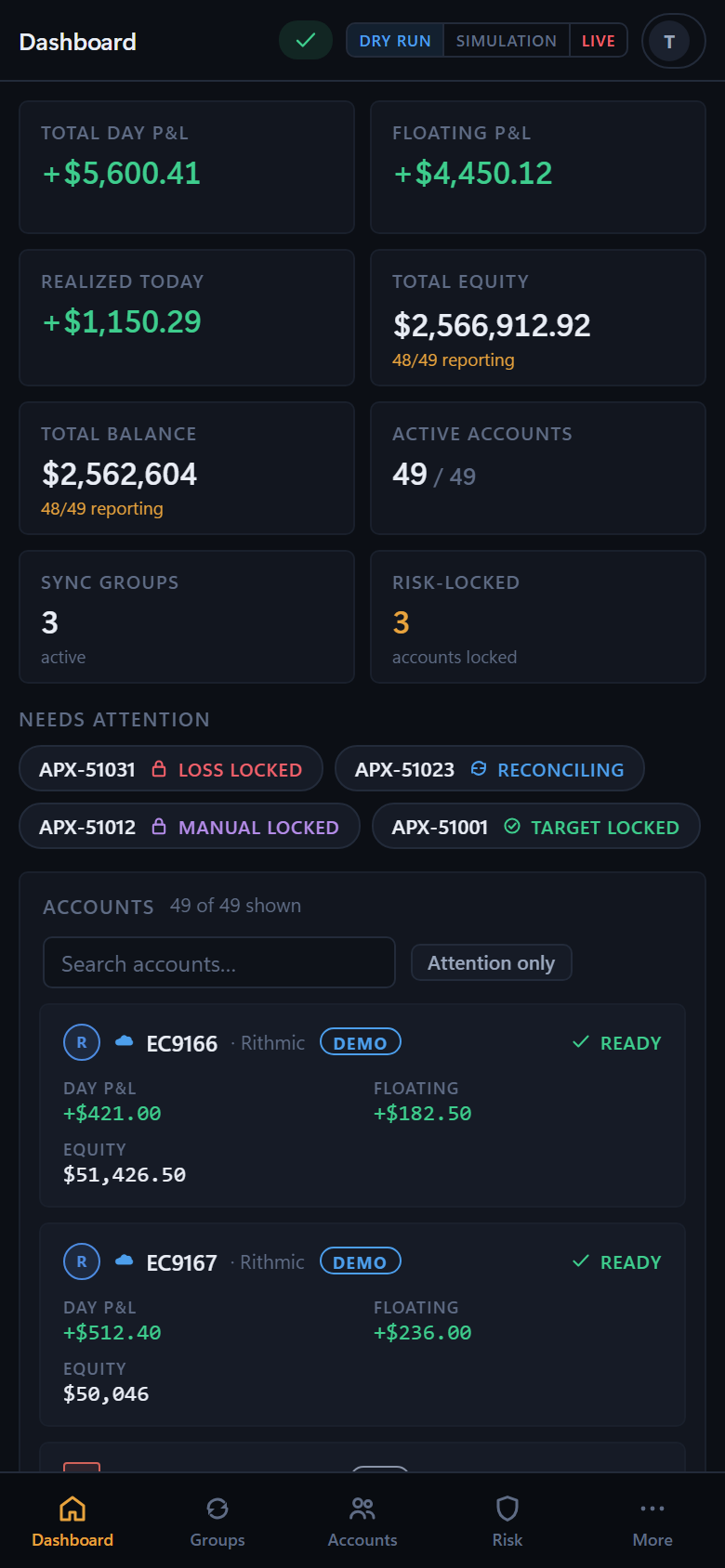
Command Deck
The whole operation, on one screen. Or in your pocket.
P&L with honest reporting coverage, account health, Sync Groups, risk state, connection status, and Cloud / Local Host state — the same Command Deck on desktop and mobile web, included with every plan.
Plans
Sized by how much you run.
Every plan includes core synchronization, the full risk-safety controls, Cloud where supported, Local Host where required, and Web/mobile access. Plans differ by capacity, not by safety.
-
Basic
2 connections · up to 20 accounts
Core sync, the risk engine, Cloud, and Web/mobile access. 10 accounts max per connection.
-
Pro
5 connections · up to 100 accounts
Everything in Basic, plus analytics, alerts, and stronger group management. 20 max per connection.
-
Elite
Unlimited connections · ~100–120+ accounts
Everything in Pro, plus high-capacity connections and advanced account management.
-
Business
Custom
Per-desk limits and custom capacity, arranged through support.
Final pricing will be announced at commercial launch. During the current beta, access is complimentary by invitation — nothing on this page starts a payment.
FAQ
Questions, answered honestly.
Is ATLAS Sync a broker?
No. ATLAS Sync is trading-operations software — it mirrors trades between accounts you already control and applies the risk limits you configure. It does not hold funds, execute as a broker or dealer, and does not provide trading advice.
What happens during the beta?
ATLAS Sync is currently invite-only. Beta access is complimentary — no billing and no payment details are ever collected during this period.
What platforms are supported today?
NinjaTrader is available now through the ATLAS Sync Local Host; direct Cloud connectivity for NinjaTrader is planned and pending platform/commercial approval. MetaTrader 5 is in beta through a Local Host bridge. Rithmic's Cloud route is in vendor validation and Tradovate's is pending platform approval — neither is advertised as available until it actually is.
What's the difference between Cloud and Local Host?
Cloud means ATLAS hosts the connection itself, so synchronization keeps running with your PC off — for platforms whose APIs support a hosted session. Local Host runs through your own Windows trading host, for platforms that require their own local software. Your Command Deck shows host health at all times either way.
Can I control risk per account, not just per group?
Yes. Every follower account gets its own multiplier and max quantity, and its own daily profit target, daily loss limit, and manual lock — independent of every other account in the group.
What will it cost after the beta?
Final pricing will be announced at commercial launch. During the current beta, access is complimentary by invitation — nothing on this site starts a payment.
How do you handle security?
Hashed credentials, real two-factor authentication, rate-limited sign-in and reset flows, and reviewable/revocable devices and sessions — see Security & Trust for the full list.
How do I get help?
Email [email protected] for product help, or [email protected] for anything else.
Ready when you are.
ATLAS Sync is in invite-only beta. Beta access is complimentary — no billing, no payment details.
Have an invitation email? Your personal access link is inside it — it walks you through creating your account and activates your beta access.